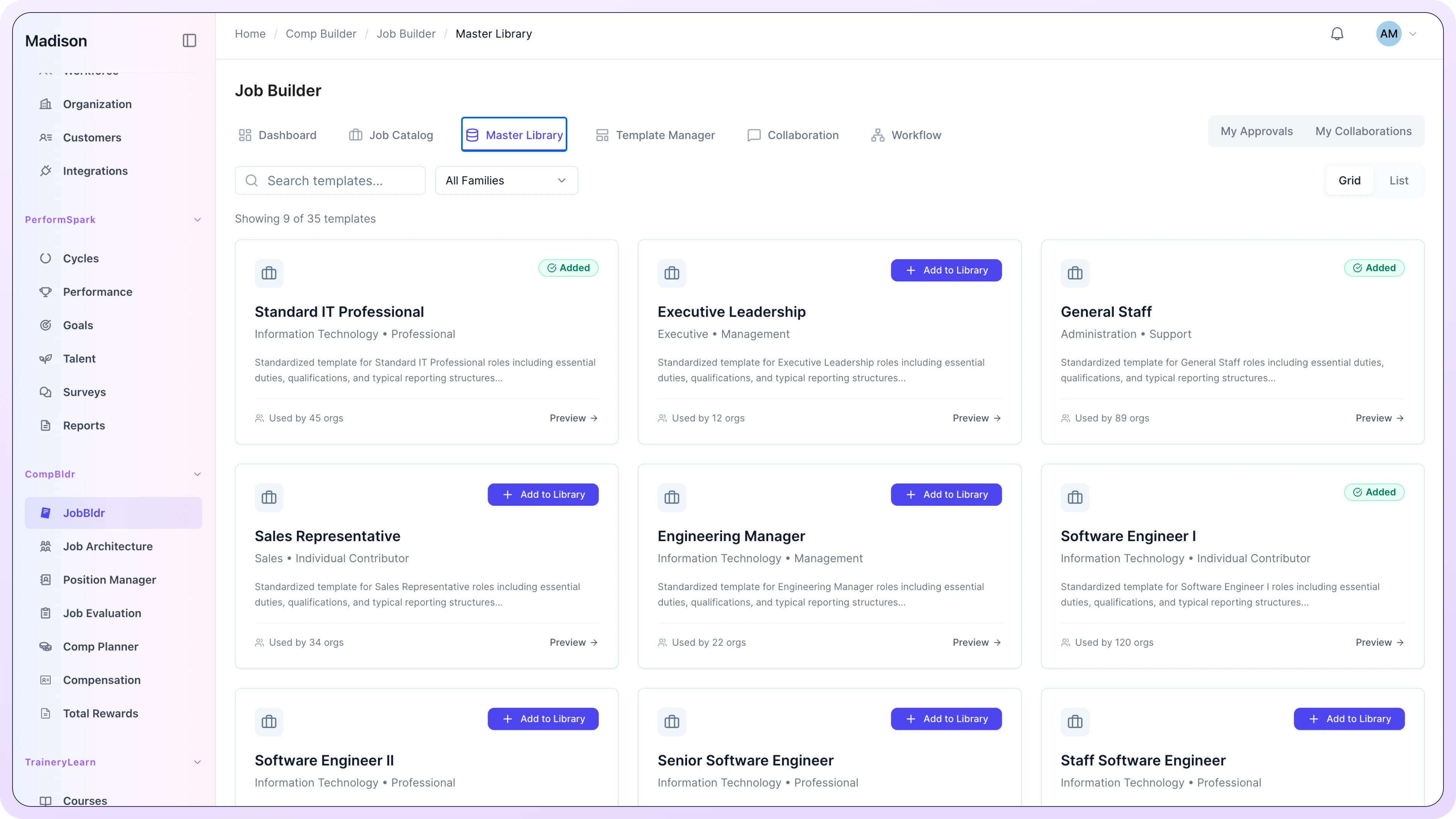
From Job Structure to Pay Decisions

Compensation Management Software That Connects Every Pay Decision

Connect job structure, evaluation, market benchmarking, compensation planning, approvals, reporting, and total rewards in one governed workflow. Give HR, Compensation, and Finance teams the context they need to review pay decisions before they move forward.

Trusted by HR and Finance teams at

National Safety Council logo with a green cross icon and text reading 'National Safety Council' and 'Arizona Chapter'.
Key Risk a Berkley Company logo in blue text.
National Safety Council logo with a green cross icon and text reading 'National Safety Council' and 'Arizona Chapter'.
Key Risk a Berkley Company logo in blue text.
The Compensation Decision Layer

Give Compensation Decisions Their Own Working Record

Your HRIS maintains workforce records. Payroll executes approved pay. CompBldr is the compensation management platform for structuring, reviewing, approving, and documenting the decisions in between.

System
What It Does
What It Governs
HRIS
Maintains employee, position, and organizational records
Workforce records
Payroll
Executes approved payroll inputs and payments
Payment processing
CompBldr
Connects job structure, evaluation, market evidence, planning, approvals, reporting, and rewards
Compensation decisions
HRIS
What It Does
Maintains employee, position, and organizational records
What It Governs
Workforce records
Payroll
What It Does
Executes approved payroll inputs and payments
What It Governs
Payment processing
CompBldr
What It Does
Connects job structure, evaluation, market evidence, planning, approvals, reporting, and rewards
What It Governs
Compensation decisions
CompBldr gives the decision-making layer between workforce records and payroll a connected, reviewable workflow.
When Compensation Context Breaks Apart

Where Does a Pay Decision Lose Its Trail?

Compensation workflow software should keep the evidence behind each pay decision connected. When role, grade, market evidence, planning, and approvals are split across spreadsheets and inboxes, that decision trail breaks.

Approved role becomes unclear
Grade rationale gets separated
Market evidence loses context
Planning and approvals fragment

Which role was actually approved?

Keep the approved job record connected to architecture, evaluation, and downstream market review so teams are not working from different role versions.

Why was this grade assigned?

Keep evaluation factors, scoring, reasoning, and version history with the grade so reviewers can understand how the outcome was reached.

Which market match was used?

Review market evidence alongside the role's family, grade, scope, evaluation context, and approved job content instead of relying on title alone.

What shaped and approved the pay decision?

Keep guidelines, employee context, budget, proposal changes, exceptions, approvals, and retained rationale tied to the final decision.

One Connected Compensation Workflow

See What Each Product Contributes to a Pay Decision

Six connected products carry job and compensation context from role definition through evaluation, market review, planning, approval, and employee communication.

  1. 1

    Job Description

    Create and maintain the reviewed role record that downstream compensation work can rely on.

  2. 2

    Job Architecture

    Organize roles by family, level, grade, and job code so structure stays consistent across the workflow.

  3. 3

    Job Evaluation

    Document JESAP factors, scores, reasoning, and grade outcomes while keeping human review in the decision.

  4. 4

    Market Benchmarking

    Review market evidence in the context of the role, grade, scope, and approved job content.

  5. 5

    Compensation Planning

    Bring eligibility, guidelines, budgets, manager proposals, approvals, and rationale into one reviewable cycle.

  6. 6

    Total Rewards

    Carry approved compensation into personalized total rewards statements for employee communication.

Start with the workflow you need today. Connect additional stages as your compensation process expands.

Supporting the connected workflow:

TrAIJESAP frameworkCompensation ReportingIntegrationsSecurity
From Job Structure to Total Rewards

One Connected Compensation Workflow

Connect job structure, evaluation, market benchmarking, compensation planning, and total rewards without rebuilding context between steps.

Start Every Pay Decision With the Right Job Record
Create, review, approve, and version job descriptions in one governed library, then carry the approved role into job architecture, evaluation, and market benchmarking.
Governed master library searchable by title, code, family, or group
Multi-level approval routing: Legal, HR Director, VP, Comp Committee
Every save is versioned; color-coded diffs show what changed and when.
External reviewers get scoped access, with no emailed Word docs and no version conflicts.
See the Job Description Workflow
Give Every Role a Consistent Structural Home
Organize roles by family, level, grade, and job code so the same job architecture supports evaluation, market benchmarking, compensation planning, reporting, and total rewards.
Job families, sub-families, and groups: one taxonomy across every entity.
JESAP-based evaluation provides structured grade inputs with reviewable scoring rationale.
Structured job codes (ENG-FSD-G1-001) that travel across every module
See the Job Architecture Workflow
Document Why a Role Belongs in Its Grade
15 compensable factors across knowledge, complexity, accountability, and conditions
Quick Evaluation mode keeps factor scoring in one focused review workflow.
Every version saved: evaluator, scores, grade result, and timestamp all permanent
See the Job Evaluation Workflow
Benchmark Roles With Market Evidence in Context
AI matching uses architectural context, including family, grade, and scope, not just title keywords
Up to six data sources blended with configurable weighting by job family
Confidence scores flag positions where percentiles may be unreliable
Approved matches carry forward; only new roles need remapping each cycle
See the Market Benchmarking Workflow
Plan Pay With Budget and Decision Context Together
Budget consumption updates live as managers submit; Finance sees the same number.
Every proposal, approval, and override is logged with the reviewer, timestamp, and rationale.
Pay compression flagged before it becomes a pay equity problem
See the Compensation Planning Workflow
Turn Approved Pay Into Clear Employee Communication
Build and review personalized total rewards statements from approved compensation data, using governed templates, imported data, cycle controls, and approval before release.
Nine professional templates with live previews help you select the right design for each population
Drag-and-drop builder with eight block types; the live preview updates instantly
Every statement is reviewed in a rendered preview before distribution; HR controls the release
See the Total Rewards Workflow
Built Around How Teams Work

One Pay Decision, Three Practical Views

HR, Compensation, and Finance review the same decision from different angles. CompBldr keeps the underlying job, market, planning, approval, and reporting context connected.

HR & Total Rewards

Keep job structure, compensation planning, approvals, pay-equity review, and employee communication connected.

Review pay decisions with the supporting role, grade, market, and approval context.
Compare pay-equity findings against consistent job and compensation structure.
Keep review evidence and retained rationale organized for internal governance.
Carry approved job and compensation context into downstream workflows.

Move from role definition to approved pay and total rewards without rebuilding the decision trail.

Compensation Analysts

Work across job architecture, evaluation, market benchmarking, planning, analytics, and reporting without recreating context in separate files.
Review market matches alongside job family, level, grade, and evaluation context.
Maintain salary structures and ranges with reviewable version history.
Use connected compensation reporting without rebuilding the source data for each review.
Surface evaluation and scoring differences for analyst review before decisions are finalized.
Spend more review time on compensation analysis and less time reconnecting job, market, and planning data.

CFOs & Finance

Review compensation budgets, proposals, approvals, and reporting with the decision context behind each change.
Review proposed total compensation impact across the decisions in a planning cycle.
Track budget consumption as proposals move through review and approval.
Keep compensation structures reviewable across business units and organizational entities.
Give Finance a live view of budget usage, range position, and pay trends with
compensation analytics.

Connect Compensation Workflows to the Systems You Already Use

CompBldr connects to your HRIS, payroll, compensation survey providers, and finance systems so compensation governance runs on accurate, synchronized data.


No manual exports between systems
No version conflicts at cycle end
No reconciliation work the week before the board meeting
View all integrations
Frequently Asked Questions

Questions People Search
Before Choosing a Compensation Platform

Written for HR leaders, Compensation Analysts, and CFOs evaluating structured compensation management for the first time, or trying again after a previous attempt didn't work out.

What is compensation management software and what does it actually do?

Compensation management software helps organizations structure jobs, benchmark pay against market data, plan salary and merit decisions, review pay equity, and communicate total rewards. CompBldr connects these workflows so HR and Finance can work from consistent job, market, planning, and reporting data instead of managing each step in disconnected spreadsheets or tools.

What is the difference between compensation management software and an HRIS?

An HRIS, such as Workday, BambooHR, or ADP, is built to store and manage employee records: headcount, payroll, benefits administration, and basic compensation data.

How do I identify and fix pay equity issues in my organization?

Identifying and fixing pay equity issues requires three things working in sequence. First, a consistent job architecture so you are analyzing compensation across roles that are genuinely equivalent in scope, level, and responsibility. Second, reliable market benchmarking so you have an external reference for what fair pay looks like for each role and level. Third, a structured demographic analysis of your current pay data, looking at comp-ratios, range penetration, and pay outcomes by gender, ethnicity, tenure, and level to identify where systemic disparities exist.

What do pay transparency laws require, and how do I make sure we're compliant?

Pay-transparency requirements vary by jurisdiction and can change over time. Organizations should confirm the rules that apply to their locations and workforce. CompBldr can support the compensation work behind transparency programs by helping teams maintain job structures, salary ranges, benchmarking records, and documented review workflows; it does not determine legal compliance.

How do you build salary bands that are actually competitive?

Building salary bands typically combines internal job evaluation, external market data, and a clear pay-positioning strategy. CompBldr supports these connected workflows so teams can review role structure, use the market-data sources they select and license, and apply their compensation strategy consistently across job families, levels, and geographies.

How long does it take to implement compensation management software?
How does CompBldr compare to tools like Payfactors, Pave, or Radford?

Market-data providers supply compensation survey data. CompBldr is designed to connect selected market data with job architecture, evaluation, planning, analytics, reporting, and total rewards workflows.

See the Governed Compensation Workflow With Your Process

Walk through how job structure, market evidence, planning, approvals, reporting, and total rewards connect in CompBldr.

Configuration, services, and pricing are scoped to your organization, selected modules, and requirements.